Free & Open Source
Approve before you
merge. Always.
A lightweight browser extension that blocks the GitLab merge button until your team approves — bringing Premium-level safeguards to every team, for free.
A lightweight browser extension that blocks the GitLab merge button until your team approves — bringing Premium-level safeguards to every team, for free.
No GitLab Premium required. No changes to your server. Just install and protect your branches.
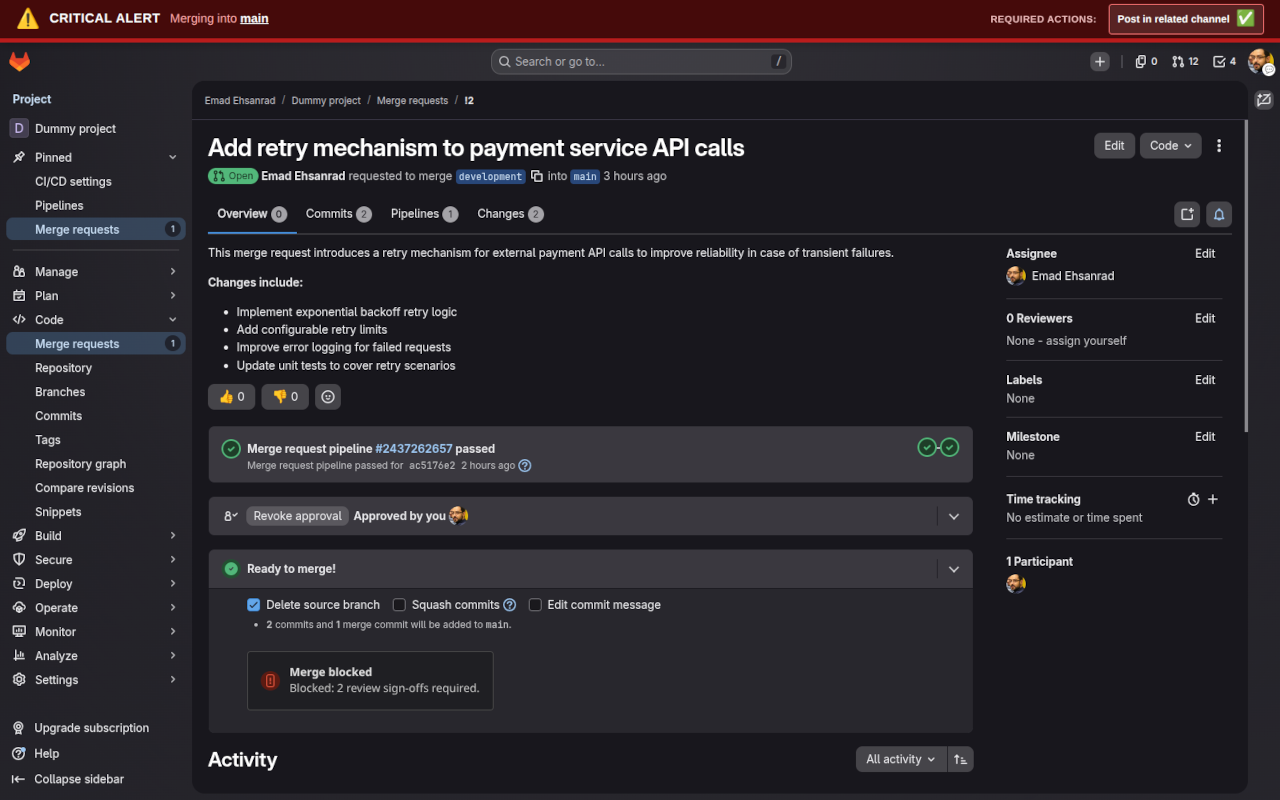
The merge button stays disabled until at least one team member has approved the MR — no more accidental merges.
Define which branches are critical — main, master, production, staging — and enforce stricter rules on those alone.
Show persistent banners that remind contributors to notify the right channels or involve a DevOps member before merging.
Works entirely in your browser. No GitLab admin access needed, no webhooks, no server-side configuration — just install.
Every team member who installs the extension follows the same review rules, standardizing your workflow automatically.
Install from the Chrome Web Store or Firefox Add-ons in seconds. Configure your branches and required approvals right in the popup.
Three simple steps separate your team from safer, reviewed merges.
Add GitLab MR Approval Guard from the Chrome Web Store or Firefox Add-ons — no account required.
Click the extension icon and set which branches to protect, how many approvals you require, and which checklist reminders to show.
The extension automatically detects the approval count and locks the merge button until your criteria are met — every single time.
The banner and disabled merge button are always visible — no way to miss them.
GitLab MR Approval Guard runs entirely in your browser. It does not collect, store, or transmit any personal information — ever.
Available for free on Chrome and Firefox. No GitLab Premium. No credit card. No catch.